The Best Way to Collect Rent Payments from Tenants


For landlords, ensuring on-time rent payments is crucial — but the method you choose can make all the difference. Online rent collection is one of the best ways to collect rent, offering convenience, security, and automation that significantly reduce late payments. In fact, landlords who accept automatic online rent payments are five times more likely to get paid on time compared to those using cash or checks.
With so many rent collection platforms available, first-time landlords may wonder which platform to choose and how to get started. This guide will walk you through the best ways to collect rent online, the basics of online rent collection, and answer frequently asked questions.
Table of Contents
- How Does Online Rent Collection Work?
- Different Ways to Collect Rent
- 10 Platform Options to Collect Rent Online
- How to Collect Rent From Tenants
- What If Some Tenants Want to Pay Rent Online But Others Don’t?
- How Do I Get Rent Payments Deposited the Next Day?
- How Do I Keep Track of Rent Receipts and Payment Documentation?
How Does Online Rent Collection Work?
Online rent collection streamlines the process of receiving rent, fees, and other tenant payments through a secure digital platform. Instead of relying on paper checks or in-person drop-offs, tenants can pay directly from their bank account or with a debit/credit card.
Here’s how it typically works:
- Landlord sets up charges: You create a payment schedule for rent, pet fees, parking, utilities, or any other recurring costs.
- Tenants submit payments online: Tenants log into the platform (or use autopay) to pay by the due date. Payments are securely transferred to your account.
- Late fees and grace periods: If a tenant misses the deadline, some platforms automatically apply late fees after any applicable grace period. Grace periods vary by state law and your lease terms.
- Payment flexibility: For tenants facing hardship, landlords can offer structured payment plans within the system rather than tracking them manually.
- Recordkeeping and receipts: Every payment is timestamped, tracked, and logged, so both landlords and tenants have a clear record of when and how rent was paid.
Different Ways to Collect Rent Online
| Method | Benefits | Considerations | Key Differences |
|---|---|---|---|
| Rent Collection Platform | Automates payments, late fees, and reminders. Includes tenant portals and integrates with leases, screening, and maintenance. | Monthly or per-unit fees may apply depending on the platform. | Designed specifically for online rent collection. Offers tools to track late and on-time payments, charge late fees, and set up recurring rent reminders. |
| ACH Bank Transfers | Secure, reliable, and typically fee-free. Direct transfer between bank accounts. | No reminders, automation, or reporting features. Manual tracking required. | Good for one or two tenants but not scalable for multiple properties. |
| P2P Apps (Zelle, Venmo, PayPal) | Fast and familiar for tenants. Payments often instant. | Some apps prohibit business use. Limited rent tracking, no automation, and possible transaction fees. | Better for casual payments; risky for ongoing rent collection. |
| Checks or Cash | Simple, traditional, and familiar for long-term tenants. | Requires manual tracking. Higher risk of late/missed payments and theft. No automation or digital receipts. | Outdated compared to digital methods; least secure option for landlords. |
When deciding how to collect rent, there are several options ranging from traditional paper checks to property management software platforms. Each method comes with its own pros and cons, so the best choice depends on your goals, number of units, and how hands-on you want to be.
- Rent collection platforms: Platforms like Avail streamline the entire rental process by automating rent collection, late fees, and reminders while also integrating tenant screening, maintenance tracking, and leases.
- ACH bank transfers: Direct bank-to-bank transfers are secure, reliable, and often free, but they lack automation tools, reminders, and reporting features that landlords may need.
- Peer-to-peer (P2P) apps: Apps like Zelle, Venmo, and PayPal are convenient and fast, but many restrict business use, lack rent-specific features, and may charge fees.
- Checks or cash: Traditional rent collection methods can work, but they require manual recordkeeping, pose higher risk, and make it harder to enforce on-time payments.
10 Platform Options to Collect Rent Online
| Platform | Platform Pricing | Payment Fees | Payout Speed | Key Rent Collection Features |
|---|---|---|---|---|
| Avail (Part of Realtor.com®) |
|
|
|
|
| Apartments.com |
|
|
|
|
| Zillow Rental Manager |
|
|
|
|
| Rentec Direct |
|
|
|
|
| DoorLoop |
|
|
|
|
| Buildium |
|
|
|
|
| TurboTenant |
|
|
|
|
| RentRedi |
|
|
|
|
| PayRent |
|
|
|
|
| Innago |
|
|
|
|
The best way to collect rent payments online is through a rent collection platform because it allows you to automate monthly withdrawals, tracks on-time and missed payments, and provides a 1099-K to report your rental income.
They can also automate rent payments, send monthly rent reminders, and offer tenant features that encourage on-time rent payments like credit bureau reporting.
If you’re in the market for a new rent collection system, here are 10 platforms to consider:
- Avail (Part of Realtor.com): Easily streamline online rent collection, tenant screening, advertising your rental, maintenance tracking, and more. Tenants can set up automated rent payments, split rent with roommates, and build credit by reporting on-time payments to TransUnion.
- Apartments.com: In addition to rental listings, Apartments.com offers a rent collection tool with online payments, late fee automation, and payment tracking. Payments can be made via ACH transfer, debit, or credit card.
- Zillow Rental Manager: Zillow’s rent collection feature allows landlords to set up automatic rent payments, track deposits, and receive rent payments directly into their bank accounts. Tenants can also use autopay to avoid late fees.
- Rentec Direct: A full-service property management platform that includes online rent payments, tenant screening, and accounting features. Landlords can automate late fees, send notices, and access financial reports.
- DoorLoop: Designed for primarily large landlords, DoorLoop offers online rent collection, automatic payment reminders, and financial reporting tools. The platform integrates with popular accounting software for seamless expense tracking.
- Buildium: A property management solution tailored to landlords and property managers handling multiple units. Rent payments can be collected online, with tenants receiving reminders and access to a tenant portal for easy payment tracking.
- TurboTenant: A free landlord platform that offers online rent collection, rental applications, and lease agreements. Payments can be made through ACH transfers or credit cards, and landlords can enable automatic late fees.
- RentRedi: This all-in-one landlord software provides mobile-friendly rent collection, maintenance tracking, and lease signing. Tenants can set up autopay, and landlords can enable custom late fees.
- PayRent: A platform that offers fee-free rent collection for landlords, automated late fees, and rent payment reporting to credit bureaus. Landlords can control when and how payments are processed.
- Innago: A free rent collection tool for landlords that allows for automatic invoicing, late fee enforcement, and tenant credit reporting. Tenants can make payments via bank transfer or card.
Check out our thorough review of the top rent collection platforms.
Some landlords prefer to use payment platforms like Zelle or Venmo for the convenience, but you’ll likely spend more time manually tracking each payment, especially if you have more than one tenant. Plus, some platforms may even flag your account as fraudulent if you’re collecting business-related payments through a personal account.
How to Collect Rent From Tenants
Here’s a step-by-step guide on how to collect rent online from your tenants.
1. Choose Your Rent Collection Platform
To collect rent online, you’ll need a platform that provides a seamless experience for you and your tenants. When shopping for a platform, consider looking for the following:
- Secure payment processing that offers bank-level encryption, and secure login features with multifactor authentication and adheres to Payment Card Industry Data Security Standards.
- Ability to block partial payments in the case of an eviction.
- Allows tenants to pay rent with different payment methods, such as a credit card, debit card, or bank transfer.
- Allows you to schedule rent payments and monthly fees for automated payment collection.
- Automatically charges late fees once a tenant is past the grace period and officially late on rent.
- Provides monthly and annual reporting on collected payments and fees to a tax professional or certified public accountant.
- Offers reliable customer support that can help address sudden issues impacting your ability to get paid.
Why Choose Avail for Rent Collection?
While standard peer-to-peer apps (like Venmo, Zelle, or PayPal) only transfer funds, Avail is purpose-built for independent landlords to automate receivables, protect legal rights, and streamline accounting—without charging platform setup fees or locking users into annual contracts.
- Flexible month-to-month pricing: Collect rent on the Unlimited ($0/mo) base plan or upgrade to Unlimited Plus ($9/unit/mo) with no annual contract commitments, unlike platforms like TurboTenant ($149–$198/year annual lock-in) or DoorLoop ($69–$99+/mo).
- FastPay next-day deposits: Accelerate funds directly into your account with next-business-day ACH deposits on Unlimited Plus, cutting down the standard 3–5 day processing window.
- Eviction protection via partial payment blocking: Stop partial rent payments with a single click—a critical legal safeguard that prevents tenants from compromising active eviction filings, which peer-to-peer apps cannot prevent.
- Lowest-cost credit reporting (CreditBoost): Motivate tenants to pay on time by enabling them to build credit history with TransUnion for $3.95/month—lower than TurboTenant ($4.99/mo), TenantCloud ($4.95/mo), or Innago ($5.99/mo).
- Unlimited bank routing with $0 setup fees: Connect distinct bank accounts for individual properties, legal entities, or dedicated security deposit accounts at no additional setup cost (unlike DoorLoop’s $25–$49 setup charges or TenantCloud’s bank account caps).
- Full end-to-end automation & live support: Rent deposits automatically log into your digital ledger, sync with income and expense tracking, and include free phone and email customer support for both landlords and renters.
2. Set Up Your Account
Once you’ve chosen your platform, create an account to get started.
With Avail, you’ll need to add your property information, set up your bank account, and then set up your payment list. The payment list can include your rent price, monthly fees, and upfront fees.
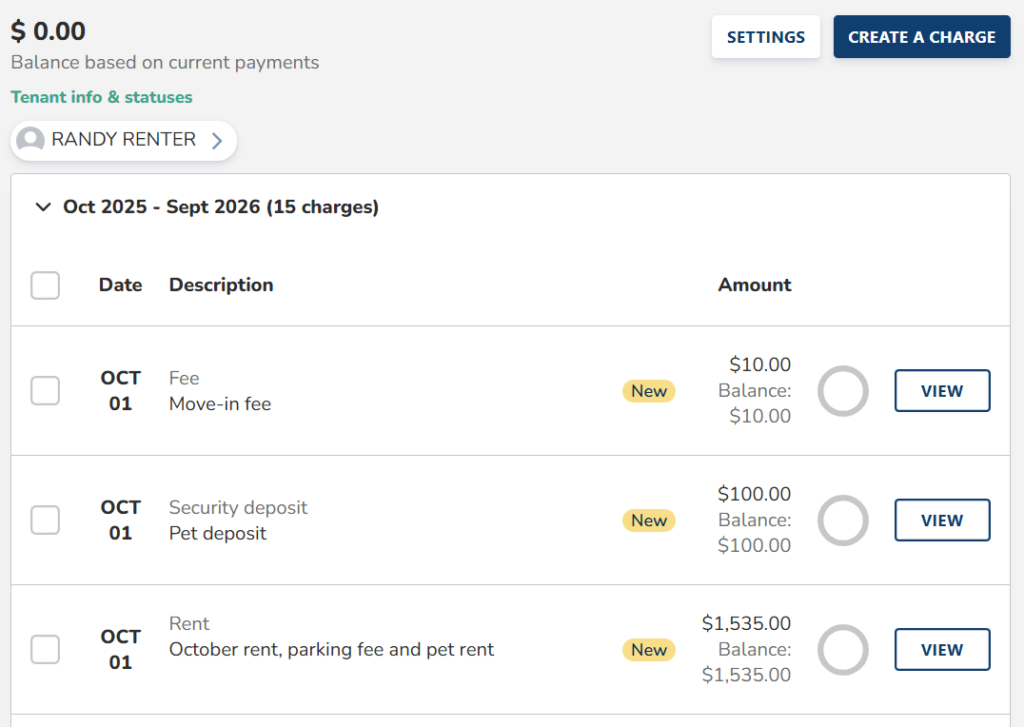
Then you can set up your grace period policy and late fees to automatically charge to your tenant’s account if they’re considered late.
After doing this, you can then turn on automated rent reminders at your desired frequency to ensure your tenant knows when rent is due.
3. Onboard Your Tenants
The tenant onboarding process is simple — you input their contact information and our system will send them an invite to join Avail. They’ll be informed about the payment list you’ve created, how to set up their banking information, and enroll in AutoPay to have funds automatically withdrawn each month.
If you have multiple tenants on one lease, they can schedule to pay their portion through Autopay either the same day or several days before the due date. Once the funds are withdrawn, they will receive an email confirmation of the transaction.
Your contact information will be on the bottom of their dashboard so contact you directly if they experience any issues.
4. Monitor Monthly Payments
In an ideal world, tenants submit their payments before or on the due date, with little to no hiccups. However, life gets busy, and without the right safeguards, tenants can slip from time to time.
For that reason, it’s important to continuously monitor your monthly payments to ensure the payment was submitted by the due date and the payment successfully went through. If you find that they were late or completely missed, ensure the appropriate fees were charged to their account and follow up with them to better understand why they were late.
What If Some Tenants Want to Pay Rent Online But Others Don’t?
If some of your tenants want to pay online but others don’t, that’s fine. Online payments aren’t going to work for every tenant, so you have the option to collect rent offline and, if they choose, manually add those payments to their Avail account.
This way, landlords have a clear record of what payments they received during the year, and all rent payments will show up on your automatically-generated rent report, which is especially helpful at tax time.
Some states do allow landlords to dictate how tenants pay rent online, so refer to local landlord-tenant laws to confirm.
How Do I Get Rent Payments Deposited the Next Day?
Standard rent payments usually take about three to seven days to transfer and deposit into a bank account. But if you need to collect rent online quickly, you can explore options like FastPay that deposit the funds as fast as the next business day.
Note that some other rental platforms charge extra for three-day payments and do not offer next-day payments, so it’s important to see what your payment and collection options are before committing to any platform.
How Do I Keep Track of Rent Receipts and Payment Documentation?
When collecting rent from tenants, it’s important to track all of your rental income for when you’re preparing your rental property taxes or analyzing the profitability of your property. You can do this manually with a spreadsheet or leverage rental property accounting software to streamline the process for you.
Payments collected through Avail (security deposits, move-in fees, pet fees, and more) automatically populate to your accounting dashboard to see how much rental income one property has generated.
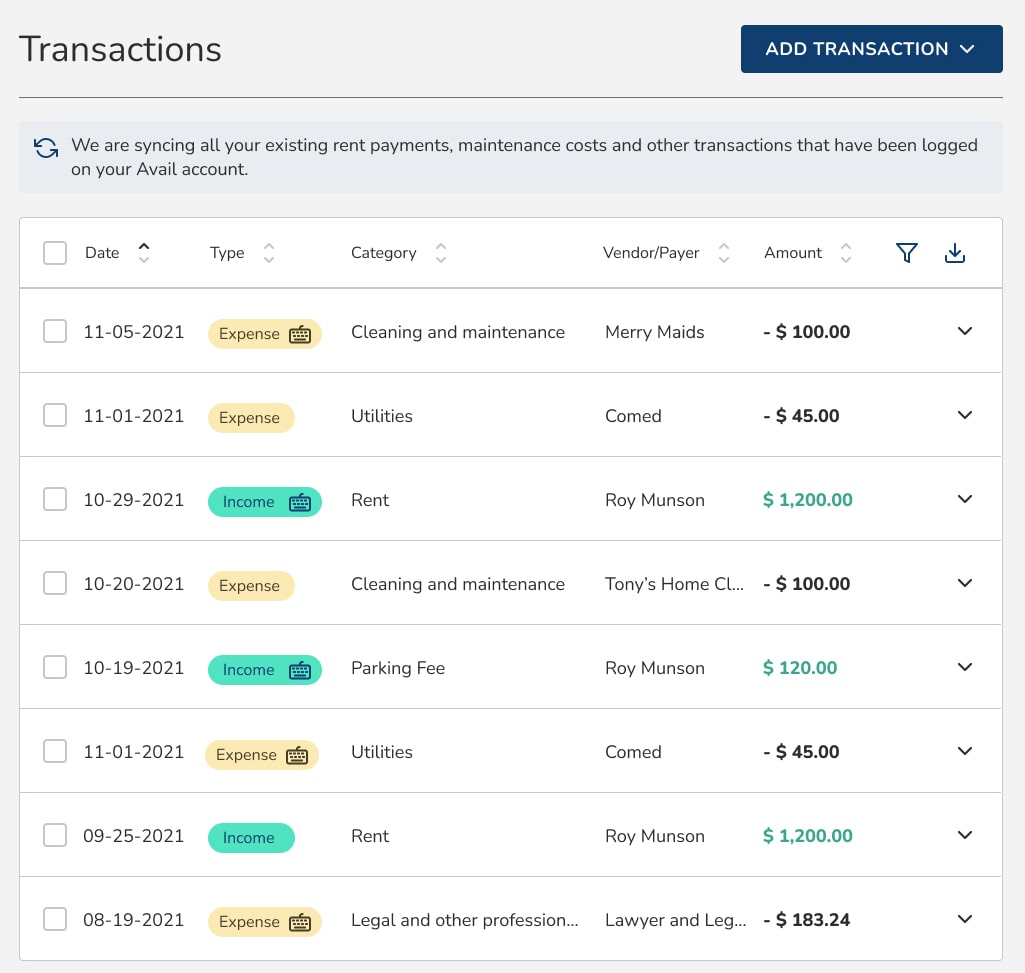
You can export the dashboard as a spreadsheet to share with tax professionals or further customize to your liking — for free.
Collect Rent Online With Landlord Software
Managing rent payments shouldn’t be time-consuming or complicated. If you’re ready to move beyond paper checks and cash, Avail provides an easy, secure way to collect rent online while offering added benefits for both landlords and tenants.
Easily automate payments, track rent effortlessly, and receive funds directly in your bank account in one place. Tenants also benefit from features like automatic payment reminders, multiple payment options, and credit-building opportunities, making it easier for them to pay on time every month.
Get started with Avail today — simplify rent collection, reduce late payments, and take control of your rental income.
- Advertise your rental online
- Collect rent online and more
- Access lawyer-reviewed lease agreements